
 Test Pattern Generator features an optional range of visual video quality motion patterns.
These patterns provide specific tests to help troubleshoot signal chain issues, and to confirm good known workflows.
This article explains what each tile on each of the motion-pattern frames actually is, how it behaves over time, how to measure it, and what to change when it fails.
Overview

Shared Conventions
Signal format
Every VVQ pattern is 10-bit narrow-range Y'CbCr: luma 64...940, chroma 64...960 nominal, data range 1...1019. 64 is nominal black, 940 is nominal white, 512 is neutral chroma. Anything below 64 or above 940 is headroom and only survives on a chain that is in full range – so the headroom tiles are simultaneously a range test.
Two Kinds of Element
• Code witnesses (EncodedCode) are written straight into the 10-bit code space and bypass all conversion: the 1-code rails, sub-black and super-white tabs, PLUGE, the white/black clip ladders, bit-truncation, the field box, chroma siting, and the QR code. They carry byte-identical codes on SDR, HLG and PQ. That invariance is the test - a code witness proves the chain carries the code, not that the chain converted it. If one of these reads wrong, the fault is in quantization, range mapping, or transport, never in color science.
• Signal-domain elements (NonlinearRgb / SceneLinearRgb / DisplayLinearRgb) resolve through the active signal, so the same declared step is correct on Rec.709 and on Rec.2020 without a second table. The color tiles are in this class.
Motion contract
Position is a pure function of the absolute frame id, and speed is declared in active-screen widths per second, never pixels per frame. So a statement like "at frame 30 the bar is at 1/4 width" is true at any rate and any raster, HD and UHD included, and the same frame ID always yields the same picture – which is what makes these usable as golden captures.
Identity
The footer prints FRAME, EVENT, CONFIG <hash>; the QR encodes the pattern id. The config hash is FNV-1a over the canonical little-endian config bytes. Disable text, capture, and compare the hash to prove a link is bit-exact.
HLG and PQ Variants - What Actually Changes
Only the three canvas designs (Orchestra, Console, Ring) and the Overview have HDR siblings, and they are not "the SDR picture brightened". Each design is drawn from declared domains and converted once through the active signal's own OETF and the Rec.2020 matrix. There is no per-signal special case in the design code – the signal is a parameter, not a variant.
EBU A/V sync, Field Motion and the Motion pair are SDR only – there is no HLG or PQ version of the EBU 1, EBU 2, FieldMotion, VVQ Motion, or VVQ Motion interlaced patterns.
The HDR Transfers are Genuinely Different
|
|
HLG (Hybrid Log Gamma) |
PQ (ST 2094) |
| Domain | Relative, scene-referred | Absolute, display-referred |
| Signal means | A relative signal level N in [0,1] | An absolute luminance L in cd/m2, 0...10000 |
| OETF | N = sqrt(3E) for E <= 1/12, else a*ln(12E - b) + c | N = [(c1 + c2*l^m1)/(1 + c3*l^m1)]^m2, l = L/10000 |
| Constants | a = 0.17883277, b = 1 - 4a, c = 0.5 - a*ln(4a) | m1 = 2610/16384, m2 = 2523/32, c1 = 3424/4096, c2 = 2413/128, c3 = 2392/128 |
| Code scale (10-bit narrow) | Y = 64 + 876*N | Y = 64 + 876*N(L) |
| Reference white | Signal-relative | 203 cd/m2 (BT.2408 HDR reference white for a 1000-nit display) |
| Backwards compatible | Yes - an HLG display shows it correctly on an SDR display | No |
| Metadata | None | Normally carries mastering display color volume |
The practical consequence: on PQ, a level label is a number of nits you can check against a meter. On HLG, a level label is a signal value, and the brightness you see depends on the display's assumed peak. That is the single biggest difference in how you use the two.
What is Identical, and Why That is the Point
Code witnesses do not change. The 1-code rails, sub-black and super-white tabs, PLUGE, the clip ladders, bit truncation, the field box, chroma siting and the QR code carry the same 10-bit codes on all three signals. The element library states this as the contract: "a code witness must prove the chain carries the code, not that the chain converted it."
Practically: if a code tile differs between your SDR, HLG and PQ captures, you have found a real fault – a range-mapping, quantization or transport bug – not a color difference.
What Does Change
Element Class |
SDR |
HLG |
PQ |
| Color bars, hue strip, saturation pairs, border quad | R'G'B' at a declared E' fraction through the 709 matrix | Signal-domain level amp * hue[ch] through the HLG OETF + 2020 matrix (hlg2020SignalHue) | Absolute nits through the PQ EOTF + 2020 matrix (pq2020NitsHue) |
| Neutral staircase | 11 steps at E' = k/10 | 6 signal anchors: 0, 1/4, 1/2, 3/4, 9/10, 1 (hlgAnchorCode) | 8 nit rungs: 0, 1, 10, 100, 203, 1000, 4000, 10000 cd/m2 (pqAnchorNitsCode) |
| Gamut spokes | Scene-linear at L = .25 | Scene-linear light through the HLG OETF | 2020 primaries, absolute |
| Skin/flesh tones | primitiveRgb (709) | primitiveSignalRgb - the same display color through the 2020 matrix, so the same appearance, different codes | Same |
| Palette chrome (backgrounds, panels, captions) | E' fractions | Signal-domain E' fractions, chosen so captions stay as readable in HLG as in SDR | Absolute nits: background 0.20, panel 0.50, edge 20, grid 8, caption foreground 203 |
| Converging wedge, Siemens star, zone plates, line gauge, castellation, hairline grid | Unchanged – these are structural or code-domain | Unchanged – these are structural or code-domain | Unchanged – these are structural or code-domain |
Note the skin tones row specifically: the comment in the element library explains that on HDR these are declared in the signal's own nonlinear domain – "this is a display-referred appearance reference, not a camera rendition, so it must NOT go through the OETF". The result is the same appearance with different 10-bit codes, which is precisely what you want when comparing SDR to HDR rendition.
The PQ Reference-White Trap
kPqRefWhite = 203.0L is the load-bearing constant. The code comments on it directly: PQ levels are absolute, so any element expressed as a fraction needs a declared reference white. Passing the bare fraction would put a "75 % bar" at 0.75 cd/m2 – invisible. "A good illustration of a value that is technically exact and practically useless."
So a PQ 75 % bar sits at 152 cd/m2, not 0.75 cd/m2, and the SDR and PQ versions of the same element sit at comparable relative levels.
How to Analyze the HDR Variants
1. Code tiles first, and compare across signals. They must be identical. Any difference is a bug, not a transfer characteristic.
2. Then read the level ladders. On PQ, check each rung against a nit meter within tolerance – the ladder is absolute, so this is a real measurement. On HLG, check the signal code against the 709 ladder and reason about display brightness separately.
3. Color tiles last. Wide-gamut behavior under a 2020 matrix is what these are for; judge them on a compliant display.
What the HDR Variants are Not
They are signal verification, not display certification. No peak metadata is claimed by the Overview; the canvas designs draw no metadata. If you need to confirm a display's peak brightness or its tone-mapping behavior, that is the HDR Exposure design (2009/2010) - a controlled measurement window with a known exact area, exact nits and a known surround, which is a different job from "prove the chain carries 2020 color correctly".
Choosing the Right Pattern
If You Want To... |
Use: |
| Verify code values, range and bit depth | Overview. It is the only one where every region is a probe target with a known answer. |
| Measure geometry precisely | Ring. The circle is the fastest aspect/pixel-aspect verdict. |
| Measure a specific instrument without crowding | Console. Room, and captions outside the samples. |
| Survey many faults at once | Orchestra. Coverage over precision. |
| Test motion, cadence or chroma lag | VVQ Motion/Interlaced. Progressive vs interlaced, side by side. |
| Check interlace / field order | VVQ Motion Interlaced, or the field box on Overview, Console or Ring. |
| Check A/V sync direction | EBU 1/2 for a quick eyeball, VVQ Motion's event ruler for a calibrated scale. |
| Verify 2020 color or HDR levels | The HLG/PQ siblings, and compare code tiles across signals. |
| Verify a display's peak or tone mapping | HDR Exposure patterns: VVQ_HDR_HLG VVQ_HDR_PQ (not any of these nine) |
Cross-Pattern Reference
Audio. The 1020 Hz guard tone at -18 dBFS is on the VVQ SDR overview only. Motion, HDR and Exposure patterns are AUDIO: none by contract – if you hear a tone on them, the source is wrong, not the tone.
Range. Headroom (nominal BT.1886, the default) or full range, selected explicitly per context, and the output is labeled accordingly. Full range is how you verify a chain carries the sub-black and above-white witnesses. Never wrap-around.
Bit depth. 8-bit (v202), 10-bit native (v210), 12-bit (v12c), 4:2:0 at 8/10/12-bit with left or centered siting, and 4:4:4 16-bit (SDR only). The 1-code rails and bit-truncation tiles make quantization and truncation directly visible at each depth.
The bit-exact loop test. Disable text, capture, and compare the printed staticHashHi / configHashHi against a clean re-run of the same context. If they differ, the link is not bit-exact.
What these are not. Not a calibration suite, not a codec scorer, not an A/V offset meter, and not an HDR certification – by design. They give you exact references; the verdicts come from your scopes, meters and eyes.
AV Sync
AV Sync
EBU Digital A/V Sync 1
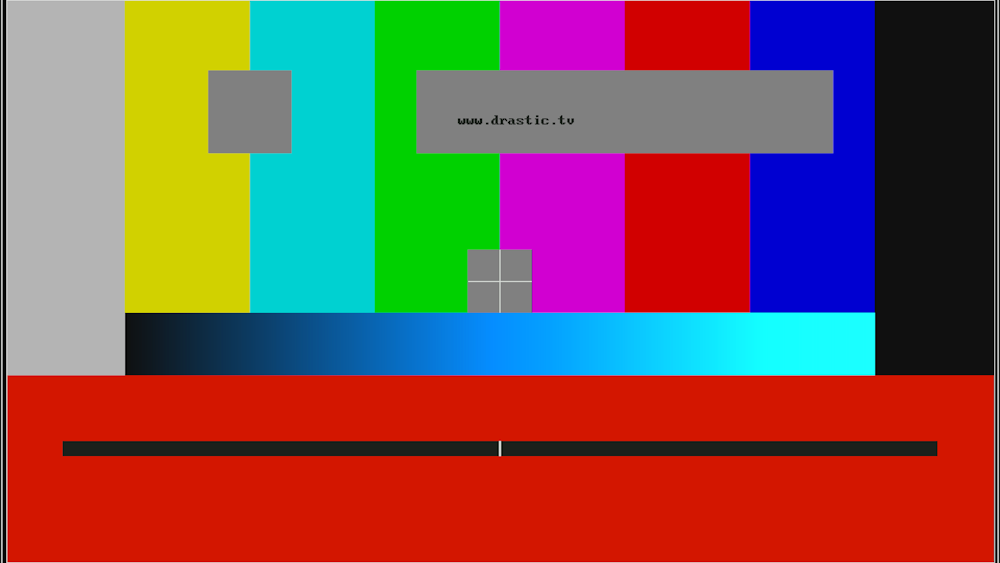
Region |
What it is |
How to analyze it |
| Full Frame 75% bars | dtp_CameraBars(..., VT_COLOR_REC709) | Y/Cb/Cr at each bar should be the Rec.709 75 % set. A uniform hue shift = wrong matrix; a luma error = wrong gamma flag. |
| Grey square, upper left | Aspect-ratio element – a true 4:3 box inside 16:9 | Square on a pixel display, stretched on anamorphic, letterboxed on a wrong-aspect input. |
| Grey band with www.drastic.tv | Reserved area - the legal "do not disturb" zone. | Any scaler that crops or overscans will clip it; that is the point. |
| Center box + white cross | Center cross, at exact raster center | Cross geometry/registration. Off-center = wrong raster size or pixel aspect. |
| Blue-to-cyan horizontal ramp | Luma / Cr / Cb ramp, spanning 64...940 luma and 512...960 chroma (HD; SD uses 254...768) | Waveform the ramp: linearity of luma, and chroma reaching both extremes without wrapping. |
| Dark red field, bottom third | "Transmission alive" background (Y=288, Cb=408, Cr=800) | Constant, non-moving reference that proves the link is live. |
| Black bar with a white center tick, sweeping vertically | The moving element | This is the A/V sync marker. It travels top-to-bottom on even seconds and bottom-to-top on odd seconds, one traverse per second. |
| Edge lines at codes 63/67/123/175/255/483/615/739/915/939 | Active-line and blanking reference markers | Verifies the chain's timing reference and that specific code values land where they should. |
The Two Patterns
The first pattern is in transmission-alive phase: a wide black bar with a white tick sweeps vertically. The second pattern is the A/V sync phase - two black bars closing in from the edges toward a center flash. Interlaced output halves the per-field travel.
How to Analyze A/V Sync
Watch the marker and listen to the sync tone. The marker's position at the instant you hear the tone gives you the offset directly and visually – no capture rig needed for a direction verdict. EBU 1 gives the sweep; EBU 2 the convergence.
How to fix what you find
• Marker and tone disagree persistently in one direction -> fixed (non-moving) latency in your chain. Re-check audio path delay and any scaler frame buffering.
• Marker stutters or reverses -> you are seeing repeated/dropped frames, not a sync problem. Check the cadence setting before touching audio.
• Bars wrong but marker perfect -> timing is fine; the fault is color (matrix/transfer tagging), not sync.
• Nothing moves at all -> the pattern is being fed as a still, or the frame counter is not advancing.
EBU A/V Digital Sync 2
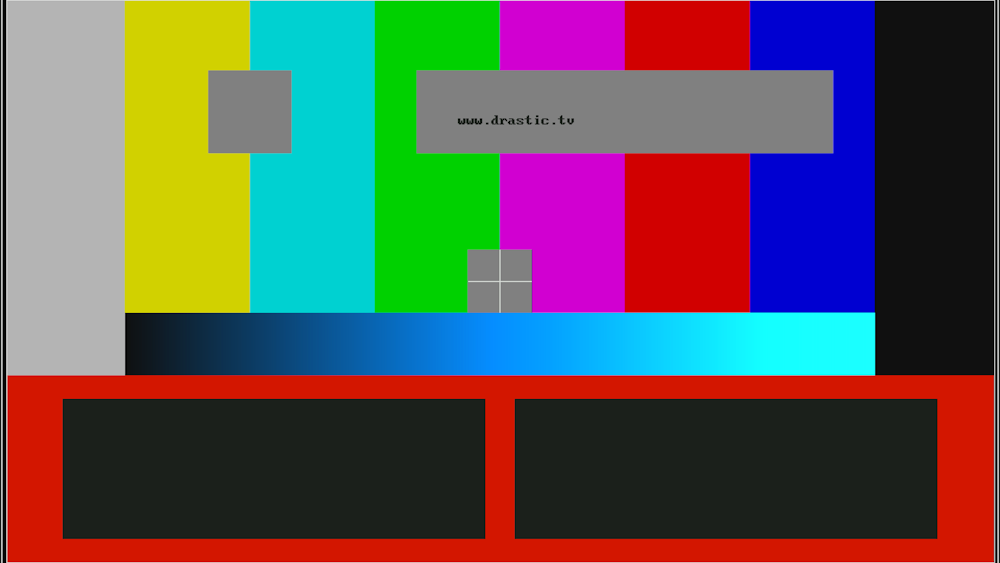
Element |
Behavior |
How to analyze it |
| Left black bar | Starts at W/16, right edge marches right by (W/2 - 1 - W/16) px per second | Its leading edge position at time t is your left-to-center sync reference. |
| Right black bar | Mirror image, marching left | The two must stay symmetric. Asymmetry = a scaler shifting geometry, or a field-order fault. |
| White center flash | Fires on the single frame where (frame + 1) % fps == 0 | This is the sync instant. The tone must coincide with the flash. |
Reading the Verdict
• Flash and tone together -> in sync.
• Tone late -> audio delayed relative to video. Tone early -> video delayed.
• Bars never quite meet, or meet off-center -> geometry/scaling fault, not a timing fault; the sync verdict is only valid once they meet symmetrically.
Limitation: this pattern measures direction and rough magnitude of A/V offset by eye. A numeric millisecond figure needs a loopback capture. The VVQ Motion pattern's event ruler gives the same reading on a calibrated scale.
FIELD
Field Motion
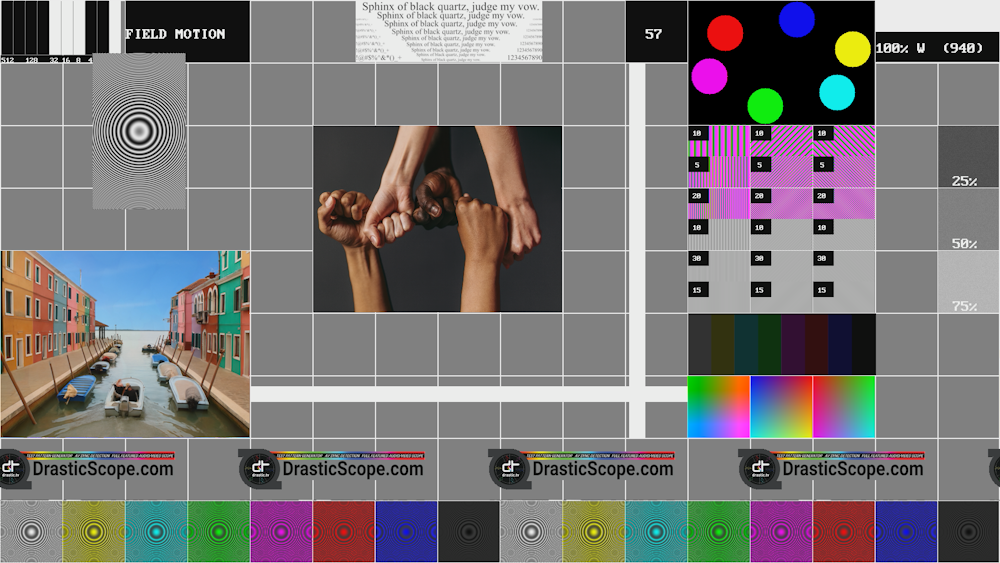
Cell Region |
Element |
How to analyze it |
| Full frame | 2 px white grid, 16 x 9, on 50 % grey | The reference lattice. Cell geometry itself is the aspect test. |
| Cell (0,0) 2x1 | 10-bit binary frame counter (frame & 0x3FF) with 512/128/32/16/8/4/2/1 labels | Read bit-by-bit against the printed frame number. Any mismatch = dropped, repeated or reordered frames. The most useful tile on the pattern. |
| Cell (2,0) 2x1 | FIELD MOTION title | - |
| Cell (6,0) 3x1 | Rocking text image, oscillating +/- one cell width on a sine | Do the edges stay crisp? A soft or doubled edge = scaling/interpolation fault. |
| Cell (10,0) | Decimal frame number | Cross-check against the binary counter. |
| Cell (11,0) 3x2 | Six colored balls on an ellipse, full rotation in 2 s | Smooth orbital motion. Jitter at maximum velocity = judder/interpolation. |
| Cells (11-13, 2-4), each split top/bottom | Frequency bursts at 10/20/30 MHz luma (top half) and 5/10/15 MHz chroma (bottom half), in three orientations: vertical, and the two diagonals | The highest-frequency tile on the pattern. Top = luma bandwidth, bottom = chroma bandwidth. |
| Cells (15, 2/3/4) | Three deterministic noise squares at 25/50/75 % grey, +/-25 codes, from a fixed xorshift32 seed | Noise should be static. Noise that crawls or freezes = temporal noise reduction misbehavior. The PRNG is seeded identically each frame, so it is bit-reproducible. |
| Cell (1,1) 1.5x2.5 | Zone plate orbiting on a circle, radius = half a cell, 2 s period | Full 2-D MTF in one moving tile. Aliasing or shimmer here is a giveaway. |
| Cell (11,5) 3x1 | Eight color bars (white..black) with a 2 s brightness pulse | Correct hues plus a clean fade to black and back. A non-black floor = black-level lift. |
| Cells (11,6) (12,6) (13,6) | Cb/Cr plane gradient, then two RGB gradient ramps with different axis mixes | Chroma-plane linearity and any chroma/luma crosstalk. |
| Cell (5,2) 4x3 | Skin-tone reference image | A real-image appearance check. |
| Cell (0,4) 4x3 | Cross-fading image pair, blended by the brightness sine | A dissolve with no banding and no color shift. |
| Row 7 | Five sliding DrasticScope.com logo images, constant speed | Text legibility under motion; the classic scaler / motion-compensation test. |
| Cell (4,1) 7x6 | White horizontal bar sweeping top-to-bottom and white vertical bar left-to-right, both ping-ponging on 2 s | Two axes, one cadence. Bars must have hard edges; softness is frame blending. |
| Bottom row, 16 cells | Sixteen RGB zone plates, cycling the eight colors twice | Chroma + spatial together. Where chroma resolution fails, the rings break up in color before luma. |
How to analyze it, in order
1. Frame integrity first. Binary counter vs decimal frame number. Nothing else means anything until this passes.
2. Cadence. Bars, balls, zone plate and fades all loop on 2 s. If they loop together, timing is intact; if they drift apart, there is a cadence fault.
3. Bandwidth. The 10/20/30 MHz luma and 5/10/15 MHz chroma tiles.
4. Scaling. Rocking text and sliding logos.
5. Noise / temporal. The three static noise squares and the zone plate.
Fixing What You Find
• Counter skips or repeats -> upstream frame loss or duplication. Fix capture before evaluating anything visual.
• Logo text frays or smears -> poor motion compensation or an interpolating scaler; bypass the scaler or switch to a sharper setting.
• Colors wrong on the bars but fine elsewhere -> matrix/transfer mismatch.
• Noise squares crawling -> temporal NR active when it should not be.
• Chroma zone plates break up before luma ones -> chroma resolution or chroma subsampling is the limit, not luma detail.
Caveat: this pattern is largely RGBA-based, not code-exact. Several elements use SetColorRGBA/PutPixel (noise squares, orbital balls, color-bar pulse, fading images) rather than the exact Y'CbCr code path, so it is excellent for motion and visual diagnosis but should not be used to verify code values. Use the Overview or one of the canvas designs for that.
BASE
BASE SDR/HLG/PQ/Interlaced
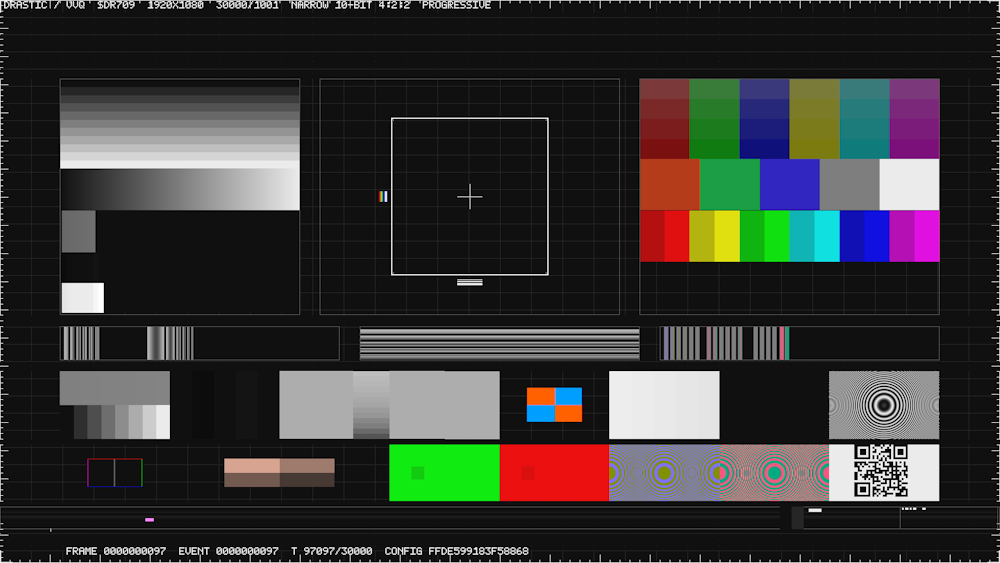
There is an interlaced variant, and the difference is structural, not cosmetic. dtp_vvq() renders both fields on every call:
• Field 0 (even rows, TFF) is sampled at t0 = n * Q/P
• Field 1 (odd rows) is sampled at t1 = (n + 0.5) * Q/P
So a moving element is correct at two different times within one frame. The footer prints FRAME, FIELD, field order (TFF/BFF) and parity, and the field ID is the event id. Both fields are redrawn every call – the render is stateless, so seeking and parallel rendering are safe.
Components
Percentages are of the raster, 1080p reference.
Element |
Where |
What it is |
How to analyze it |
| Title line | y 0-6 | One line: DRASTIC / VVQ <SDR709> <WxH> <rate> NARROW 10-BIT 4:2:2 INTERLACED | Read first. Confirms signal, raster, rate and scan in one glance. |
| Levels container | x 6-30, y 14-58 | Gain/range/quantization evidence that never moves | Waveform the whole container; expect exact code steps. |
| - neutral staircase | 38 % of height | 11 steps at E' = k/10, k = 0..10 | Verify each step's code and the equal 10-step spacing. |
| - smooth ramp | 18 % | Continuous 1-step ramp | Banding or stuck codes are visible immediately. |
| - 1-code rail | 18 % | 32 adjacent patches 1 code apart, base 104 | The bit-depth test. Truncation shows as missing steps. |
| - black tabs | 13 % | 48 60 63 64 65 68 80 | Sub-black carry. Needs full range. |
| - white tabs | 13 % | 922 936 939 940 941 944 984 1019 | Above-white carry. |
| Geometry datum | x 32-62 | Exact .28H square + cross, broken diagonal, RGB triplets, 1/2/4-px lines | The focal feature. Square = aspect; circle/registration; 1-px lines = finest detail a chain should carry. |
| Color container | x 64-94, y 14-58 | Gamut boundary evidence | Select on a scope and compare against the printed codes. |
| - gamut spokes | 34 % | 6 linear-light spokes at L = .25, chroma in {.8,.9,.95,1} | Saturation collapse / gamut mapping. Tagged crossings. |
| - matrix witness | 22 % | Known R/G/B + neutral + white triplets | Matrix coefficient check (2126/0722 family) |
| - saturation pairs | 22 % | 6 pairs (R,Y,G,C,B,M) at .75/.95 | Unequal-channel saturation handling |
| H response | x 6-34, y 58-64 | Y' = 1/2 + 1/4 cos(2*pi*f*i), f in {1/32, 1/16, 1/8, 3/16, 1/4, 3/8} | resolution limit |
| V response | x 36-64 | Same bursts, vertical | V filtering - the 4:2:2 vs 4:4:4 difference shows here. |
| Chroma edges | x 66-94 | Cb/Cr-only packets, +/-0.10 impulses at the siting column | Chroma bleed, phase and siting errors |
| Instrument band A | x 6-94, y 66-78 | 8 equal tiles: BITTRUNC, PLUGE, GAMMA, FIELD BOX, CHROMA SAMPLE, WHITE CLIP, BLACK CLIP, ZONE PLATE Y | See the tile table below. |
| Instrument band B | x 6-94, y 79-89 | BORDER QUAD (1), FLESH (2), MATRIX INVERSE (2), ZONE PLATE CB, ZONE PLATE CR, QR (1 at 1080p, 2 at 2160p) | See the tile table below. |
| Motion track | y 90-94 | Moving strip + event gate + binary frame/field ID | Liveness and simple motion evidence. |
| Footer | y 94-99 | FRAME ... FIELD ... TFF PARITY n T ... CONFIG <hash> | Full identity |
The Twelve Instrument Tiles
Title |
Codes |
What a fault looks like |
| BITTRUNC | 16-step 1-code fine band + 8-step reference | Steps merging = truncation to 8 bits somewhere in the chain. |
| PLUGE | 64 48 64 80 64 black-clipping witness | Classic setup black-level control. Adjust display black until the patches are indistinguishable. |
| GAMMA | 13-row strip, .31-.79, plus a 1-code checker | The checker is what makes an 8-bit-limited chain visibly stripe. |
| FIELD BOX | Two-line checker, right half inverted | Field order, parity loss and comb artefacts read directly. On the interlaced pattern the field box is the primary interlace check. |
| CHROMA SAMPLE | Orange/blue quadrants at 2-px pitch, 1-sample phase offset | Chroma siting, phase and 4:2:2 chroma delay. |
| WHITE CLIP | 949 940 931 921 912 | Where your chain starts clipping highlights. |
| BLACK CLIP | 63 64 65 65 66 | Where your chain starts crushing shadows. |
| ZONE PLATE Y | 60-frame loop | Full 2-D luma MTF (luma Modulation Transfer Function). |
| BORDER QUAD | 75 % bars, R/Y/G/C | Gross matrix/gamma check plus overscan/ringing at the edges. |
| FLESH | 4 measured skin tones | Appearance reference in the signal's own domain. |
| MATRIX INVERSE | SD/HD code-vs-decoded pairs at 25/50/75 % | Each pair shows a Y'CbCr code next to the R'G'B' that should decode to it. A wrong matrix shows as a visible mismatch between the two halves. |
| ZONE PLATE CB / CR | 60-frame loops, shared phase | The two chroma rings must stay in step with the luma ring. Divergence = luma/chroma temporal mismatch. |
| QR | drastic.tv/vvq/<PATTERN> | Machine-readable confirmation of which pattern you are looking at. |
The Caption Contract
Every label band sits outside its sample rect. Nothing is drawn over the samples you are measuring, so each tile stays exactly probeable. This is why the console/orchestra/ring designs were built the same way.
How to Use It
1. Title line: confirm signal/raster/rate/scan.
2. Levels container: gain, range, bit depth.
3. Datum: geometry and registration.
4. Color container: gamut and matrix.
5. Response row + instrument bands: filtering, clipping, chroma.
6. Field box (interlaced): field order.
7. Footer: capture the config hash for the bit-exact loop test.
Fixing What You Find
• 1-code rail has missing steps -> your chain is not really 10-bit. Check the output format selection and any intermediate 8-bit node.
• Headroom tabs clip -> you are in headroom range, not full range. The sub/super-white witnesses only exist in full range.
• PLUGE patches distinguishable -> display black level is wrong.
• Field box combs or flips -> field order or deinterlacer issue.
• Chroma fringing on the datum edges -> chroma not co-sited with luma.
• Hash mismatch across a link -> not bit-exact; find where it diverges by capturing at each hop.
CONSOLE
Console SDR/HLG/PQ
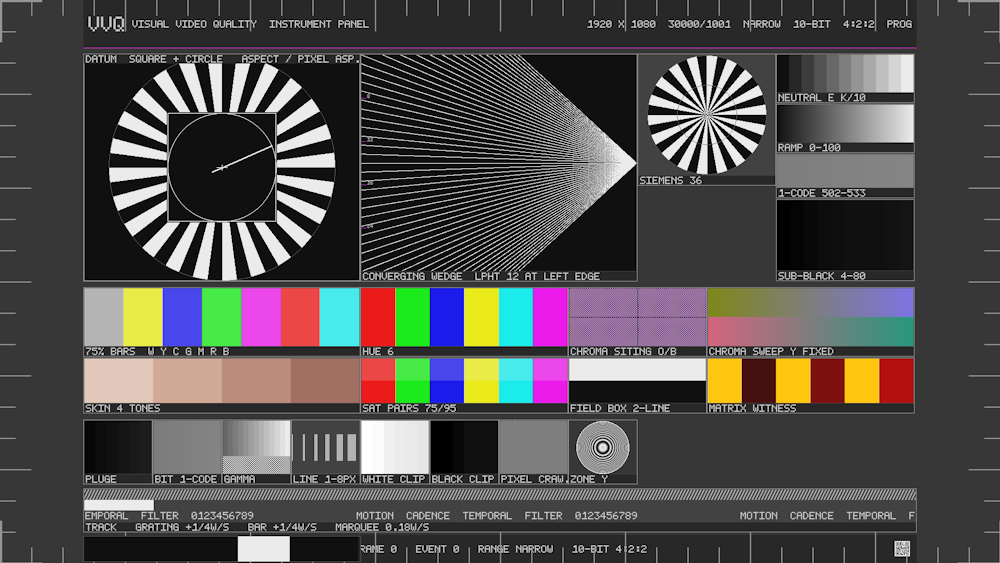
The Hero: Four Jobs in One Focal Point
Part |
What it Does |
| Ring target, 48 sectors behind | Motion sharpness and judder – the angular frequency rises toward the center. |
| Exact square with inscribed circle | Aspect ratio (square) and pixel aspect (circle), with corner registration brackets and a center cross whose horizontal arm is longer, so orientation is unambiguous. |
| Sweep hand over it, 4 s per revolution, with a counterweight | Cadence. The counterweight exists so a hand that reverses (a field-order or frame-doubling fault) is impossible to miss. |
That combination is the design's central idea: four different failure modes, one place to look.
Band |
Element |
How to analyze it |
| Hero (cols 0-3) | Ring target 48 + datum + sweep hand | Ring for motion, square for geometry, hand for cadence. |
| Converging wedge (cols 4-7), LPHT 12 at left edge | Straight lines radiating to a focus at the right edge, so vertical frequency rises smoothly and exactly from 12 LPHT to unbounded | The strongest spatial test on the card. A frequency scale is printed in the same LPHT units the tile uses, so you read the wedge against the caption, not against a remembered number. |
| Siemens star, 36 sectors | Radial star, frequency rising to the center | Find the point where spokes merge into grey – that is your resolution limit. |
| NEUTRAL E K/10 | 11-step neutral staircase | Code accuracy and spacing. |
| RAMP 0-100 | Smooth 1-code ramp, sampled at center so it is symmetric about its endpoints | Banding. |
| 1-CODE 502-533 | 32 adjacent 1-code patches | Bit-depth / truncation. |
| SUB-BLACK 4-80 | 4 16 32 48 56 63 64 65 72 80 | Headroom carry; also where black crushing starts. |
| 75 % BARS W Y C G M R B | 7 bars at 75 % signal, in white/yellow/cyan/green/magenta/red/blue order | Matrix and gamma. |
| SKIN 4 TONES | Four measured skin tones, 244,214,198 / 224,178,158 / 200,146,126 / 170,112,96 / |
Appearance. Deliberately spread widely enough to be told apart side by side. |
| HUE 6 | Six hues at 95 % amplitude | Hue interpretation and rotation. |
| SAT PAIRS 75/95 | Two amplitudes per hue, R Y G C B M | Overshoot, clipping and gamut-collapse behavior, one hue at a time. |
| CHROMA SITING O/B | Orange/blue quadrants at 2-px pitch with a 1-sample phase offset | Siting, chroma phase and 4:2:2 delay. |
| FIELD BOX 2-LINE | Two-line checker, right half inverted | Field order and comb artefacts. |
| CHROMA SWEEP Y FIXED | Luma pinned at mid-scale, Cb/Cr walking the full nominal excursion in opposite directions | Isolates chroma amplitude and phase from luma. Because Y is fixed, anything you see is chroma. |
| MATRIX WITNESS | Code-vs-decoded pairs at 25/50/75 % | Matrix coefficients. |
| Instrument strip (8 tiles) | PLUGE, BIT 1-CODE, GAMMA, LINE 1-8PX, WHITE CLIP, BLACK CLIP, PIXEL CRAWL, ZONE Y | Same semantics as BASE's band A, plus the 1-8 px line gauge (line thickness, ringing, smallest resolvable detail). |
| Motion track | Ruler with 20 % ticks, then three lanes: grating +1/4 W/s, bar +1/4 W/s, marquee 0.18 W/s | Temporal filtering, frame blending, motion-compensated scaling. The marquee is there because motion faults are far more visible on text than on any synthetic pattern. |
| Footer | Binary counter, QR drastic.tv/vvq/B, and FRAME ... EVENT ... RANGE NARROW 10-BIT 4:2:2 | Identity. |
The Caption Contract
instMake() draws the panel and caption band, then returns the sample rect only - inset, caption excluded. Nothing is ever drawn inside a returned rect except the element itself. That is a hard contract with whoever probes the pattern, and it is why the layout can be dense without corrupting measurements.
How to Use It
Work left to right, top to bottom, in weight order: hero (geometry + motion) -> wedge and star (spatial) -> levels and codes -> color -> instrument strip -> motion track.
Fixing What You Find
• Square not square or circle not round -> non-uniform scaling or wrong pixel aspect. This is the fastest geometry check on any of the nine patterns.
• Converging wedge goes soft before the caption's number -> your chain is low-pass filtering earlier than declared.
• Spokes stall into a flat disc -> resolution limit reached; compare against the 1-code rail result to separate spatial from quantization limits.
• Sweep hand judders or reverses -> cadence or field-order fault. The counterweight is what makes a reversal visible.
• Chroma sweep shows luma movement -> luma/chroma crosstalk in the scaler.
• Marquee shimmers while the bar is clean -> temporal filter / motion compensation is the culprit, not resolution.
MOTION
Motion - SDR/HLG/PQ/Interlaced
VVQ Motion
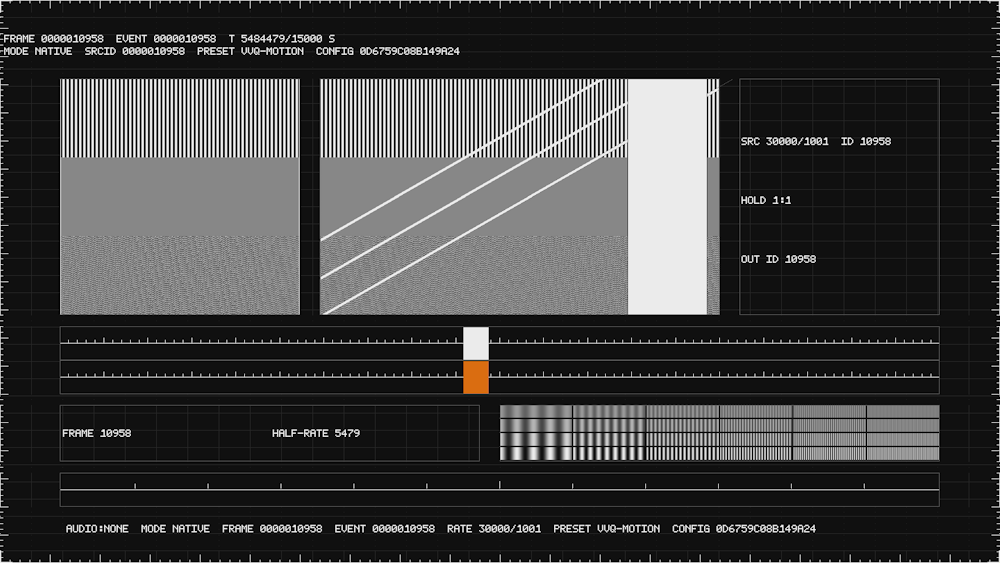
The Core Idea: Static Match vs. Moving Slats
The same three textures appear twice - once frozen, once moving. That pairing is the most valuable thing on the pattern, because it separates spatial filtering from motion-adaptive behavior. A chain can look perfect on the static copy and still fall apart on the moving one, and only this layout shows you both side by side.
Band |
Contents |
The Three Textures |
| STATIC MATCH (x 6-30, y 14-56) | The same textures at zero speed, plus 1-px white reference edges just inside both vertical edges | Band 0: coarse high-contrast vertical edges, 4 px black/white, 50 % duty. |
| MOVING SLATS (x 32-72, y 14-56) | The same three textures moving at +1/4 width per second - oblique (///) high-contrast edges, band-limited fine detail, and a bounded deterministic texture behind a translating occluder, with datum brackets and datum slats | Band 1: band-limited fine detail, 2-px lines alternating at 355 and 665 (35 %/65 % luma). |
| Band 2: a bounded deterministic texture, FNV-1a hash of the sample position, codes 256...768 neutral. Identical for a given frame id, so it is reproducible. |
The moving fine texture is the timing ruler: because its content is a pure function of position, you can tell exactly how far it advanced between frames.
Region |
Contents |
How to Analyze It |
| Cadence cells (x 74-94, y 14-56) | Source frame ID vs output frame ID, and the hold schedule for the configured cadence | This is the tile that makes 2:1 hold rendering verifiable. nativeSignal means sourceId == outputId; in cadenceSequence mode sourceId(n) = floor(n * srcRate / rate). |
| Luma shuttle (x 6-94, y 58-64) | A white block riding a ruler lane at 0.125 W/s across a 1/4 W span, with a triangle reflection, 1 % and 5 % ticks from the center line | Y motion speed and linearity. Measure against the ticks. |
| Chroma shuttle (x 6-94, y 64-70) | The same geometry and the same timing, but with Y held at 50 % and Cb-/Cr+ | The chroma-lag witness. Because the two shuttles are geometrically identical and simultaneous, any visible offset between them is chroma lag. This is the classic 4:2:2/interlaced chroma delay fault, made directly visible. |
| Frame / half-rate cells (x 6-48, y 72-82) | FRAME n and HALF-RATE n/2 | Temporal ID pairing. A half-rate cell that advances at the wrong rate means your cadence is off by a factor. |
| F x A tile (x 50-94, y 72-82) | Frequency x amplitude: 6 frequencies {1/32, 1/16, 1/8, 3/16, 1/4, 3/8} cycles/sample x 4 amplitudes {1/4, 1/2, 3/4, 1} | Spatial and temporal aliasing in one tile. Y' = 1/2 + A/2 cos(2*pi*f*i), chroma neutral. |
| Event ruler (x 6-94, y 84-90) | EARLY (-ms, -fields) ... [SYNC EVENT] ... LATE (+fields, +ms), 11 ticks for k = -5..+5 events, center taller | Audio early/late relative to the visual event. Events fire at n_k = ceil(k * 2P / Q) with a 4-frame active window, i.e. one event every 2 seconds. |
| Footer | Full identity, plus HOLD/LIVE when a cadence source is set |
How To Use It
1. Cadence cells first – confirm the source-to-output frame ID relationship matches what you configured.
2. Static match vs moving slats – compare the same texture frozen and moving.
3. The two shuttles together – this is the chroma-lag test.
4. F x A tile – find the highest frequency that still shows motion rather than a static pattern.
5. Event ruler + 1020 Hz tone – A/V offset direction.
Fixing What You Find
• Static copy clean, moving copy soft -> motion-adaptive filtering or a frame-blending / motion-compensation fault. Not a resolution problem.
• Chroma shuttle visibly behind the luma shuttle -> chroma lag. Look for 4:2:2 processing, chroma resampling, or a deinterlacer.
• Cadence cells show HOLD when you expect LIVE (or the reverse) -> the cadence source setting is not what you think it is.
• F x A tile: high-frequency cells freeze -> temporal aliasing. The low amplitude/high frequency cells are the first to alias, by design.
• Moving fine texture advances unevenly -> frame repeat or drop. Cross-check against the frame and half-rate cells.
• Event ruler reads off-center against your tone -> A/V offset; correct the audio path latency, then re-check.
Note on cadence: the cadence source is offered for Motion, progressive only, by design. Interlaced cadence is deliberately not offered, because cadenceSequence semantics over fields are ambiguous. If you need to test interlaced cadence, do it downstream of this pattern.
VVQ Motion Interlaced
What Actually Changes
Aspect |
Progressive |
Interlaced |
| Field sampling | One instant per frame, t = n*Q/P | Two instants per frame: field f at t = (2n+f) * Q/(2P) |
| Row ownership | Progressive owns every row | A field writes only its own parity rows (ownsRow()) |
| ID lane | FRAME n / HALF-RATE n/2 cells | Field-parity ribbons instead of frame/half-rate labels |
| Footer | Frame + event | Field ID and field order (q) per field |
| Cadence | Source selectable | Deferred – interlaced cadence is not offered in Settings, by design |
Everything spatial is identical to the progressive versions: the static-match / moving-slats pairing, both shuttles at 0.125 W/s, the F x A tile, and the event ruler. So the comparison that matters is progressive vs interlaced on the same chain - if interlace introduces an artefact, this pair isolates it.
How to Analyze It
1. Field parity ribbons – the ribbons must alternate in the correct order for the declared field order. A repeated or swapped ribbon is a field-order fault visible without any instrument.
2. Field rate shuttle smoothness – the shuttles are sampled per field, so watch them at field rate, not frame rate.
3. Field flip at the shuttles – does the shuttle appear to step backwards once per field? That is field-rate judder, invisible in progressive.
4. Y/C shuttle parity – the chroma shuttle against the luma shuttle, exactly as in image 6. Interlace makes chroma lag worse, so this is the most sensitive tile on the interlaced pattern.
5. Moving slats – oblique edges are the worst case for field-based interlacing; comb artefacts appear here first.
Fixing What You Find
• Shuttle steps backwards once per field -> field-rate judder. Look at frame-rate conversion rather than the display.
• Comb on the oblique slats only -> classic interlace on diagonal detail. A motion-adaptive deinterlacer is the fix; a static one will not do it.
• Chroma shuttle lags further here than in 2005 -> chroma is being subsampled per field. Check for chroma resampling on the interlace path.
• Ribbons repeat or swap -> field order is wrong (TFF vs BFF), or a field was dropped upstream.
• Moving fine texture advances unevenly -> field repeat/drop, same as progressive but now at field rate.
ORCHESTRA
Orchestra - SDR/HLG/PQ
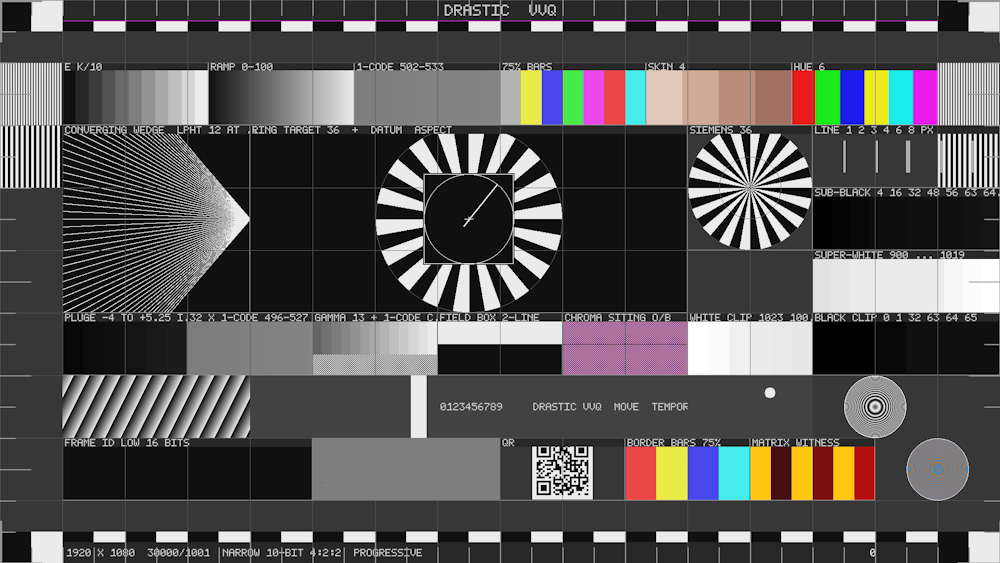
Components
Band |
Elements |
| Castellation top and bottom | Alternating light/dark blocks. Crop, edge detection, overscan and ringing all announce themselves here first. |
| Header / footer | DRASTIC VVQ; footer 1920 X 1080 30000/1001 NARROW 10-BIT 4:2:2 PROGRESSIVE plus a decimal counter. |
| Four corner bursts | At the extreme corners, LPHT 12 on the top pair and LPHT 6 below. LPHT is line pairs per hundred lines of this tile, so the drawn period is exactly h/(2*lpht) pixels - measurable with a ruler, and it does not silently change meaning when the tile resizes. Where the tile cannot resolve the figure, a flat accent band is drawn deliberately as a "past the limit" marker rather than a passing result. |
| Row 1 – level and color strip (6 equal tiles) | E=K/10 (11 steps), RAMP 0-100, 1-CODE 502-533 (32 patches), 75% BARS, SKIN 4, HUE 6. |
| Rows 2-4 – hero | Ring target 36 with the aspect datum and sweep hand inside it. The target turns (motion sharpness, judder, field order) while the square+circle stays fixed (geometry). Separating those two jobs in one tile is this design's main idea. |
| Converging wedge, LPHT 12 at left edge – frequency rises smoothly and exactly from 12 LPHT to unbounded at the focus. | |
| Siemens star 36, and a 1/2/3/4/6/8 px line gauge. | |
| Sub-black 4 16 32 48 56 63 64 65 72 80 and super-white 900 920 936 939 940 941 944 984 1003 1019. | |
| Row 5 – instrument tiles | PLUGE -4 to +5.25 IRE (codes 29/46/64/82/99/110), 32 x 1-CODE 496-527, GAMMA 13 + 1-code check, FIELD BOX 2-LINE, CHROMA SITING O/B, WHITE CLIP 1023 1003 960 940 931 921, BLACK CLIP 0 1 32 63 64 65. |
| Row 6 – motion band | MOVING GRATING +1/4W/S, BAR +1/4W/S, MARQUEE 0.18W/S, BALL 2S PERIOD, ZONE PLATE Y 60-FR. Each has its declared speed or period in the caption. |
| Row 7 – counters and code witnesses | FRAME ID LOW 16 BITS (a binary barber-pole – a frozen, repeated, dropped or reordered frame is unmistakable here even when the rest of the frame looks static, and unlike a printed number it needs no reading), 1-PIXEL CRAWL, QR drastic.tv/vvq/A-SDR, BORDER BARS 75%, MATRIX WITNESS, ZONE PLATE C 60-FR. |
| Cell grid over everything | 1-px hairline grid - the Sarnoff signature, and it doubles as a 4:2:2 chroma siting witness because every boundary is a shared-chroma column; a mis-sited chain fringes exactly on those lines. |
| Corner crop rulers | elFiducials() - they deliberately touch the raster edge; repeating identity lives inside the graphics-safe area instead. |
The Zone Plates
Two of them, one luma and one chroma, each an exact 60-frame loop (phase advances by exactly 2*pi/60 per frame, so the loop is bit-exactly periodic). The luma disc is a true 2-D zone plate cos(2*pi*k*d^2) with k = 1/(4r), which puts DC at the center and the Nyquist limit exactly at the rim – one element, the whole 2-D MTF. The chroma disc holds luma at Y=502 and swings Cb/Cr in quadrature, so it is a true rotating chroma vector rather than luma-modulated color.
How To Use It
Treat it as a survey: it tells you which faults exist. When one tile flags a problem, switch to the Console view or the Overview and measure it there with room to work.
Fixing What You Find
• Hairline grid fringes in color -> 4:2:2 chroma siting is off. This is the grid's actual job, and it is very sensitive.
• Castellation rings at the top/bottom edge -> overscan or a soft scaler edge.
• Ring target judders while the datum is rock steady -> motion sharpness or cadence, not geometry. The two jobs are deliberately separated.
• Corner burst goes flat with an accent band -> that is the designed "past the limit" marker, i.e. this tile's frequency is genuinely unresolvable at this size. Not a fault.
• 16-bit counter stalls or repeats -> frame integrity; fix that before anything else.
• 1-pixel crawl tile shows color speckle -> expected on 4:2:2: one luma pixel carries no chroma at all. The speckle is the measurement.
RING
RING - SDR/HLG/PQ
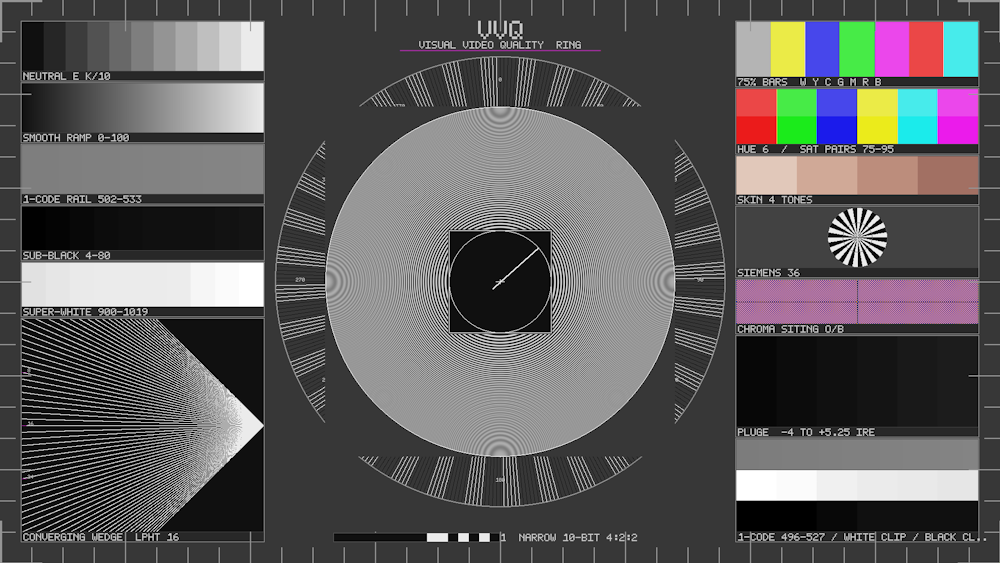
Why a Circle
The design argument is that a circle carries information a square cannot. It is the only element that reveals non-uniform X/Y scaling, scaler anisotropy and pixel-aspect error simultaneously with the spatial-frequency sweep around its edge. The Overview has a square only.
The cost is honest: the raster corners are used inefficiently, and a viewer at a distance reads shape before content, making this the least efficient of the three for a working engineer.
Geometry: the Ring is the Master Dimension
rOuter = min(W,H) * 40/100, rInner = rOuter * 78/100. The two satellite columns are then sized to exactly fill the space the ring leaves (colW = (W/2) - m - rOuter - gap). Deriving one from the other is deliberate: in a 16:9 frame a circle plus two five-deep column stacks cannot both be generous, and sizing them independently is what produced an earlier collision.
Region |
Element |
How to Analyze It |
| Graduated outer band | Alternating light/dark blocks every 5 degrees, plus twelve graduation labels at 0, 30, 60 ... 330 | The ring doubles as a circular castellation and as a rotation reference. |
| The disc | A true 2-D zone plate, cos(2*pi*k*d^2), k = 1/(4*rInner), so the rim period is exactly 4 raster lines and everything inside is progressively coarser. Phase advances by exactly 2*pi/60 per frame. | DC at the center, Nyquist at the rim: the whole 2-D MTF in one element, and it is the dominant focal instrument. |
| Inscribed datum | Exact square + circle, side = rInner * 3/5, with the sweep hand over it | Aspect, pixel aspect and cadence in the middle of the disc. |
| Left satellites | NEUTRAL E=K/10 (11 steps), SMOOTH RAMP 0-100, 1-CODE RAIL 502-533, SUB-BLACK 4-80, SUPER-WHITE 900-1019, then a large CONVERGING WEDGE LPHT 16 with 8 / 16 / 24 scale marks | The wedge gets real area here, which is why it is useful. LPHT 16 at the left edge. |
| Right satellites | 75% BARS W Y C G M R B, HUE 6 / SAT PAIRS 75-95, SKIN 4 TONES, SIEMENS 36, CHROMA SITING O/B, then PLUGE -4 TO +5.25 IRE and a combined 1-CODE 496-527 / WHITE CLIP / BLACK CLIP tile |
Color, acuity, siting and clipping. |
| Title band | VVQ + VISUAL VIDEO QUALITY RING + accent rule, placed only if the ring left room for it | A title overlapping the focal instrument is worse than none, so it is suppressed rather than allowed to collide. |
| Footer | 1920 X 1080 30000/1001 NARROW 10-BIT 4:2:2 and the 16-bit binary counter | Identity and frame integrity. |
| Corner crop rulers | elFiducials() | Crop and edge reference. |
The Three Motion Tiles
Tile |
Element |
Purpose |
| The disc | zoneDisc, luma, 60-frame loop | The dominant motion instrument. |
| The inscribed datum | datumHand sweep hand, 4 s/rev | Cadence and judder. |
| Title band | binaryCounter, frame & 0xFFFF | Frame integrity, out of the way of the focal instrument. |
How to Use It
1. Is the circle round? If not, you have non-uniform scaling or wrong pixel aspect – the fastest geometry verdict of all nine patterns.
2. Walk the disc outward from the center and note where the rings stop resolving. That is your 2-D MTF limit.
3. The graduation labels let you confirm the ring is not rotating when it should be static, and confirm the sweep hand's 4 s period.
4. Left column for levels and codes, right column for color and acuity.
Fixing What You Find
• Circle is an ellipse -> non-uniform X/Y scaling or wrong pixel aspect. Nothing else on the card diagnoses this as directly.
• Rings break up well before the rim -> the rim is the Nyquist limit by design; breaking up earlier means your chain is low-pass filtering inside the resolvable band.
• Graduation labels unreadable but satellites fine -> the labels are 1-px scale text, the finest detail on the pattern. If they alias, expect the 1-px line gauge to fail too.
• Sweep hand not completing 4 s -> cadence or frame-rate conversion fault.
• Rings show color fringing at the outer edge -> chroma resolution is the limit, and the wide-gamut primaries push chroma harder than luma.
Trademarks, Registered Trademarks, and Copyrights
Trademarks, Registered Trademarks, and Copyrights
Avid Technology, Inc. - Avid Media Composer®, Avid MediaCentral®, Avid Interplay®, ProTools®, and Avid NewsCutter® are either trademarks or registered trademarks of Avid Technology, Inc. or its subsidiaries in the United States and/or other countries.
Blackmagic Design Pty. Ltd. - DaVinci Resolve, DaVinci Fusion, UltraStudio, DeckLink, Intensity Pro 4K, UltraScope, and RED are either trademarks or registered trademarks of Blackmagic Design Pty. Ltd. or its subsidiaries in the United States and/or other countries.
Bluefish Technologies - Bluefish444, IngeSTore, Symmetry, Kronos, Epoch, Epoch:Neutron, Fury, Lust, Vengeance HD, Deepblue, Envy SD, and Epoch:SuperNova are trademarks of Bluefish Technologies
Bridge Technologies Co AS - Bridge Technologies is a trademark of Bridge Technologies Co AS
Dolby Laboratories – Dolby, Dolby Vision, the double-D symbol, and Millicast are registered trademarks of Dolby Laboratories.
Drastic Technologies, Ltd. – trademarks specified here.
DTS - DTS, the Symbol, and DTS and the Symbol together are registered trademarks of DTS, Inc.
Epic Games, Inc. - UNREAL ENGINE is a trademark of Epic Games, Inc..
Lynx Technik AG - LYNX TECHNIK AG is a trademark of LYNX TECHNIK AG.
Matrox Electronic Systems, Ltd - Matrox and Matrox product names are registered trademarks and/or trademarks of Matrox Electronic Systems, Ltd.
Society of Motion Picture and Television Engineers - SMPTE is a trademark of Society of Motion Picture and Television Engineers.
SRI International - SARNOFF CORPORATION is a trademark of SRI INTERNATIONAL.
Tektronix, Inc. - Tektronix® and all identified Tektronix trademarks and logos are the property of Tektronix, Inc. or its wholly-owned subsidiaries